
Hey there! I’m Martin, and if you’re anything like me, you probably spend way too much time checking where you stand in your bestie’s “universe.” There’s something strangely addictive about seeing if you’re their Mercury or if you’ve been demoted to Neptune, right?
But lately, I’ve been getting a ton of DMs from friends asking the same thing: “Martin, why can’t I see the Snapchat planets on this person’s profile anymore?” It usually happens right after someone switches to a Public Profile or starts chasing that “Snap Star” creator status. If you’ve been scratching your head looking for that gold-bordered badge only to find… nothing… you aren’t alone. Let’s grab a virtual coffee and break down exactly why the Snapchat planets public profile mystery is happening and how the 2026 updates have changed the game.
My Personal Experience with the Public Profile Disappearing Act
About two months ago, my friend Sarah—who is basically a full-time creator now—finally hit the “Create Public Profile” button. We’ve been Mercury-level besties for years. I went to her profile to do my usual “closeness check,” and the Friend Solar System badge was just gone.
I honestly thought my Snapchat Plus subscription had expired or that I was experiencing a major visibility glitch. I re-installed the app, cleared my cache, and even checked my internet connection. Nothing worked.
Then it hit me: the moment Sarah transitioned her account to prioritize her “Public” presence, the “Private” friendship metrics took a backseat. I learned the hard way that Snapchat treats your “Friendship Profile” and your “Public Profile” as two totally different worlds. Even if you’re a Plus subscriber, once a profile goes public, the rules for seeing those celestial rankings change instantly.
Read More: Hide Snapchat Planet Rank: Martin’s Guide to Privacy (2026)
Why the Snapchat Planets Public Profile Isn’t Showing
If you’re looking for the Friend Solar System on a public profile and seeing a blank space, it’s usually not a bug—it’s a feature (or a lack thereof). Here are the primary reasons why this happens in 2026.
1. The “Public Profile” Barrier
When someone creates a public profile, they are essentially opening a “front door” for the world to see. However, the Snapchat Planet system is built on private vs public settings. The Solar System is designed to be an intimate, private metric between two friends.
On a standard profile, you can tap the “Best Friends” badge to see your planet. But on a Public Profile, the layout changes to show “Subscribers” and “Public Stories.” Often, the “Friendship Profile”—where the planets live—is tucked away or restricted to ensure the creator’s privacy isn’t compromised by showing their inner circle to the general public.
2. Snapchat Plus Limitations
Even with a Snapchat Plus subscription, you aren’t a “universal viewer.” To see a planet, both users generally need to have a specific type of relationship established. If a creator has their settings tuned to “Public,” the algorithm sometimes pauses the display of the Solar System badge to prevent “rank-chasing” from random followers. Have you ever felt like the app is trying to protect creators from the drama of friendship rankings? Because it definitely is.
3. The “Solar System” Toggle is Off
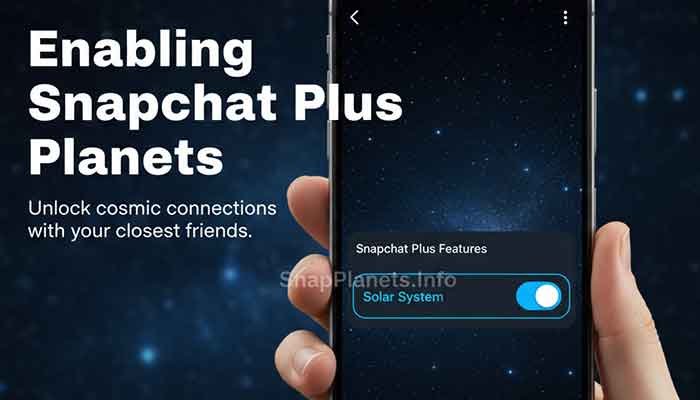
As of the latest 2026 updates, Snapchat has actually made the Solar System feature opt-in by default because of the “friendship anxiety” it was causing. If your friend with the public profile hasn’t manually gone into their Snapchat Plus settings and toggled “Solar System” to ON, you won’t see a planet on their profile—period.
Breaking Down the Visibility Rules
To make this easier to digest, I’ve put together a quick comparison table. This should help you figure out if you’re seeing a glitch or just the way the app is designed to work.
Comparison: Visibility by Profile Type
| Feature | Standard Private Profile | Public / Creator Profile |
| Viewable by | Added Friends Only | Anyone (Subscribers) |
| Solar System Badge | Visible (if both are 2-week BFs) | Often Hidden or Restricted |
| Subscription Required? | Yes (Snapchat Plus) | Yes (Snapchat Plus) |
| Visibility Glitch Risk | Low | High (due to UI overlays) |
| Privacy Focus | High (Mutual Friends) | Low (Public Audience) |
How to Fix the “Missing Planet” Issue
If you know you are best friends with someone, and you both have Snapchat Plus, but the Snapchat planets public profile is still missing, try these steps:
- Check the “Friendship Profile” specifically: Don’t just look at their public landing page. Tap on their Bitmoji, then look for the three dots or the “Friendship” link. Sometimes the “Public Profile” covers the “Private Friendship” details.
- Verify the 2-Week Rule: You won’t see a planet until you’ve been on each other’s Best Friends list for at least two weeks. If they just went public and you just added them, the “Mercury” status won’t pop up instantly.
- Update the App: I know it sounds cliché, but 2026 has seen three major UI overhauls. If you’re even one version behind, the badge might fail to render on Public Profiles.
- Mutual Plus Subscription: While you can sometimes see your rank in their system if only you have Plus, it’s way more stable when both parties are subscribers.
Martin’s Note: “Honestly, this part confused me at first, but remember that Snapchat is moving toward a more ‘mental health friendly’ vibe. They are making it harder to obsess over these rankings on public-facing accounts.”
FAQ: Your Burning Questions Answered
Q: Can I see someone’s planets if I’m only a ‘Subscriber’ and not a ‘Friend’?
A: No. You must be added as a mutual friend to even have a chance at seeing the Solar System badge. Subscribers only see what the creator chooses to show publicly.
Q: Does a Public Profile hide your Best Friends list from everyone?
A: Yes, your actual “Best Friends” list is always private to you. The planets are the only way someone else can “guess” their rank, and even then, they only see their position, not everyone else’s.
Q: Is the ‘visibility glitch’ on public profiles a known bug?
A: It’s less of a bug and more of a layout priority. Snapchat prioritizes the “Subscribe” button and “Bio” on public profiles, which often pushes the Friendship Badge into a secondary menu.
Q: Can I turn off my planet so my friends can’t see where they rank?
A: Absolutely! You can toggle off the “Solar System” in your Snapchat Plus settings. If you do this, your friends will see the “Best Friends” badge, but it won’t show them a specific planet.
Martin’s Final Tip
My biggest piece of advice? Don’t let the Snapchat planets public profile missing badge stress you out. If you can’t see your planet on a creator’s profile, it’s almost always because Snapchat is trying to keep their “Professional” public side separate from their “Personal” friend side.
If you really want to know where you stand, just keep the streaks alive and keep snapping! The algorithm knows you’re there, even if the badge is playing hide-and-seek.
Would you like me to walk you through the exact steps to find the “hidden” friendship menu on a Public Profile? Understanding the Snapchat Solar System
This video is a great visual guide for anyone trying to navigate the 2025-2026 UI and find where those elusive planet badges are hiding.