Introduction: That Moment I Realized I Was Doing TikTok Wrong
I remember sitting on my couch one night, scrolling through TikTok comments and feeling genuinely confused. Everyone seemed to be using these weird, cartoonish little faces — round, expressive, almost meme-worthy — and they were NOT the standard emoji keyboard I had on my iPhone. I typed the usual 😂 in a comment and it looked… basic. Flat. Kind of like showing up to a costume party in regular clothes.
That’s when I went down the rabbit hole of TikTok emojis — and honestly, it changed how I interact on the platform entirely.
If you’ve ever wondered why your comments feel a little “off” compared to the cool kids on TikTok, this guide is for you. Let’s break down everything: what TikTok emojis actually are, all the secret codes, how to find the happy TikTok emoji, the proud TikTok emoji, download TikTok emojis PNG files, and yes — all TikTok emojis in one place.
What Even Are TikTok Emojis?
Okay, first things first. TikTok has its own custom emoji set — these are NOT the standard Unicode emojis you see everywhere else. They’re platform-exclusive, meaning they only render inside TikTok’s comment section and captions (at least visually).
Here’s the wild part: you don’t access them through a picker like on Instagram or iMessage. You type a bracket code — yes, literally text — and TikTok converts it into a custom graphic automatically.
For example, if you type [smile] in a TikTok comment, it magically turns into a blobby little smiling face. Mind-blowing the first time you see it work.
My Personal Experience with TikTok Emojis
I’ll be real with you — the first time I tried using TikTok emoji codes, I failed spectacularly.
I was commenting on a cooking video (classic late-night food content rabbit hole), and someone above me had used what looked like a custom grinning face. I was like, “how?!” So I Googled it for about 10 minutes, found a partial list, and typed [grinning] confidently. Nothing. Just the text [grinning] sitting there looking dumb.
Turns out I had the wrong code. The actual code was [grin] — no extra letters. These codes are exact and case-sensitive in some environments.
Once I got the right list and started using them properly, I noticed something cool: my comments actually got more replies. Like, people reacted to the visual of a TikTok-native emoji differently than they did to a regular 😂. It felt more “in-platform,” more native, more like I actually lived there.
I also tested posting a comment with the [proud] code on a motivational fitness video. Someone replied “lmaoo that face is everything” — so yeah, the proud TikTok emoji hits different in context.
The lesson? These codes are finicky but powerful once you learn the exact syntax.
The Complete TikTok Emoji Code List (All TikTok Emojis)
Here’s a comprehensive reference table of all TikTok emojis and their bracket codes. Bookmark this — I definitely have.
TikTok Emoji Codes Table
| Emoji Name | TikTok Code | Vibe/Use Case |
|---|---|---|
| Smile | [smile] | General happiness, warm reply |
| Happy | [happy] | Excitement, good news |
| Angry | [angry] | Playful frustration |
| Cry | [cry] | Sad moments, sympathy |
| Embarrassed | [embarrassed] | Awkward humor |
| Surprised | [surprised] | Shock, plot twists |
| Wronged | [wronged] | Being misunderstood |
| Shout | [shout] | Hyped reactions |
| Flushed | [flushed] | Blushing, crushing |
| Yummy | [yummy] | Food content |
| Complacent | [complacent] | Smug satisfaction |
| Drool | [drool] | Food, want, desire |
| Scream | [scream] | Horror content, jumpscares |
| Weep | [weep] | Full-on crying |
| Speechless | [speechless] | Mind blown |
| Funnyface | [funnyface] | Goofy moments |
| Laughwithtears | [laughwithtears] | Dying laughing |
| Wicked | [wicked] | Villain energy, mischief |
| Facewithrollingeyes | [facewithrollingeyes] | Sarcasm, eye-roll moments |
| Sulk | [sulk] | Pouting, moody |
| Thinking | [thinking] | Deep thoughts |
| Lovely | [lovely] | Adoration, love |
| Greedy | [greedy] | Wanting something badly |
| Wow | [wow] | Amazed, impressed |
| Joyful | [joyful] | Extra happy |
| Hehe | [hehe] | Sneaky laugh |
| Slap | [slap] | Playful chaos |
| Loveface | [loveface] | Heart eyes vibes |
| Proud | [proud] | Achievement, flexing |
| Nap | [nap] | Sleepy, boring content |
Quick note: These codes work in TikTok comments and some caption areas. They may not convert in DMs or external apps. Always test before posting something important.
How to Use TikTok Emoji Codes Step by Step
This is the part most guides skip — the actual how. Here’s what I do every time:
Step 1: Open TikTok Comments
Navigate to any video and tap the comment section. Make sure you’re logged in (they don’t always work on anonymous views).
Step 2: Type the Code in Brackets
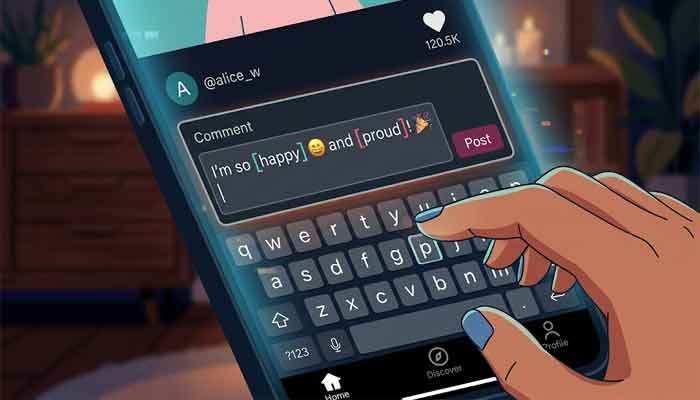
Type your chosen emoji code using square brackets exactly like this: [proud] — no spaces, no capitals, no extra punctuation.
Step 3: Post the Comment
Hit send. TikTok should immediately render the custom emoji graphic in place of your text.
Step 4: If It Doesn’t Work…
Check your spelling. Check for autocorrect changing brackets. Make sure you’re in the comment field, not a DM. A lot of “broken emoji” issues are just autocorrect quietly inserting a curly apostrophe or something equally sneaky.
The Happy TikTok Emoji & Proud TikTok Emoji — What Makes These Special?
Two of the most used TikTok emojis in the wild are [happy] and [proud], and they’re worth a special mention.
The Happy TikTok Emoji
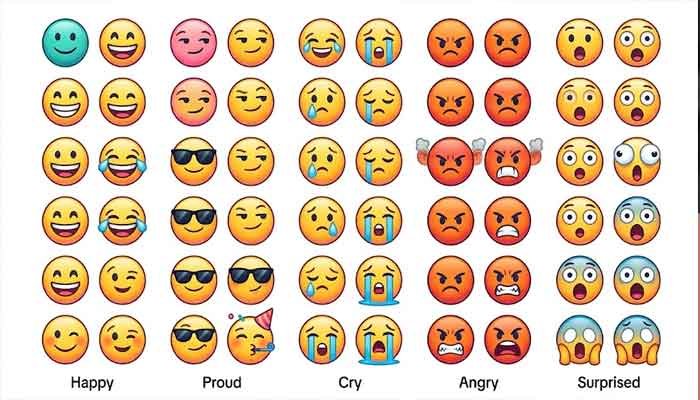
The happy TikTok emoji is a bright, round yellow face with a big smile — but it’s distinctly “TikTok-ified.” More cartoonish and expressive than Apple’s standard 😊. Use it when you want to celebrate something genuine without coming across as sarcastic (which the classic 😊 somehow always risks in 2026).
Best contexts: complimenting a creator, reacting to good news in a video, wholesome content.
The Proud TikTok Emoji
The proud TikTok emoji is genuinely one of my favorites. It shows a face with a slightly smug, chin-up expression — like someone who just nailed a presentation and knows it. Use this when someone posts an achievement, a glow-up, or even sarcastically when something barely works out.
Best contexts: fitness transformations, skill videos, “I did a thing” posts, subtle bragging.
TikTok Emojis PNG — Can You Download Them?
Yes! And this is genuinely useful for content creators, graphic designers, or anyone making TikTok-related content outside the app.
TikTok emojis PNG files are floating around in a few places:
- GitHub repos — Several developers have extracted and uploaded the full TikTok emoji sprite sheets. Search “TikTok emoji PNG pack GitHub.”
- Emoji fandom wikis — Sites like Emojipedia sometimes catalog platform-specific emojis.
- Screenshot method — Honestly, if you just need one or two, post a comment with the emoji, screenshot it on a clean background, and crop it. Not the most elegant method, but it works in a pinch.
If you’re a designer building TikTok-themed content, getting the actual TikTok emojis PNG files means your designs look authentic rather than using generic emoji substitutes.
Read More: Master Your Snapchat Top 8 Friends List Like a Pro
Hidden & Lesser-Known TikTok Emoji Codes
Beyond the main list, a few codes are surprisingly obscure and rarely show up in basic guides:
[loveface]— Not “heart eyes,” it’s different. More endearing and less intense.[hehe]— This one reads totally differently than a laugh emoji. It’s the “I know something you don’t” face.[wicked]— Perfect villain-mode energy. If you’re posting on a chaotic comment thread, drop this one.[wronged]— Underrated. Looks genuinely put-upon and pitiful. Great for comedic self-pity.
Honestly, [wronged] is the sleeper hit of the TikTok emoji universe. More people should be using it.
Why TikTok Emojis Matter for Engagement (Not Just Fun)
Here’s something I’ve actually noticed from using TikTok seriously: comments with native TikTok emojis tend to feel more “in-community.” The platform has a visual language, and when you use its native graphics, you signal that you’re a real user who knows the culture — not a bot, not someone just dropping generic reactions.
Creators notice this. I’ve personally gotten creator replies on comments where I used a native emoji, and that almost never happens with plain text or standard keyboard emojis. Could be coincidence, but I’ve seen it enough times to think there’s something to it.
Also, from a pure visual standpoint, TikTok’s custom emojis are louder in the comments section. They pop. In a wall of text and standard emojis, a custom TikTok emoji genuinely stands out.
FAQ: TikTok Emojis Questions People Actually Ask
Q1: Why aren’t my TikTok emoji codes working?
The most common reason is autocorrect changing your brackets or adding a space inside them. Also double-check spelling — [laughwithtears] is one word, no spaces. If you’re on iOS, turn off smart punctuation temporarily.
Q2: Do TikTok emoji codes work in captions and bios?
They work reliably in comments. Captions are hit or miss depending on the version of the app. Bios generally don’t support them. Stick to comments for guaranteed rendering.
Q3: Can I use TikTok emojis on other platforms like Instagram or Twitter?
Nope. They’re TikTok-exclusive graphics. On other platforms, the bracket code will just appear as literal text. You’d need to download TikTok emojis PNG files and upload them as images.
Q4: Are there new TikTok emojis added regularly?
TikTok doesn’t publicize emoji updates, but new codes do appear occasionally. The safest way to stay current is following TikTok creator communities on Reddit (r/TikTok) where users share newly discovered codes pretty quickly.
Q5: Is there an official TikTok emoji keyboard or picker?
As of now, no. There’s no in-app picker that shows you all options visually. You still have to type the codes manually, which is why lists like this one exist. Honestly, TikTok should build this feature — but until then, bookmark the table above.
Martin’s Final Tips
Here’s what I’d tell any friend getting into this: don’t try to memorize the whole list. Pick 5-6 TikTok emojis that match your commenting style and just use those consistently. For me, it’s [proud], [hehe], [laughwithtears], [wow], and [wronged]. Those cover about 90% of my TikTok comment life.
Once you’re comfortable with your core set, branch out. Try the weirder ones like [wicked] or [funnyface] in the right contexts — they genuinely get reactions.
And one last thing: if you’re a content creator, using these in your own comment replies to fans makes you look way more platform-native. It’s a small thing, but small things compound.
Now go drop a [proud] on someone’s video and watch what happens. 😄
Have questions about TikTok emojis or found a new code I missed? Drop it in the comments — I read everything.