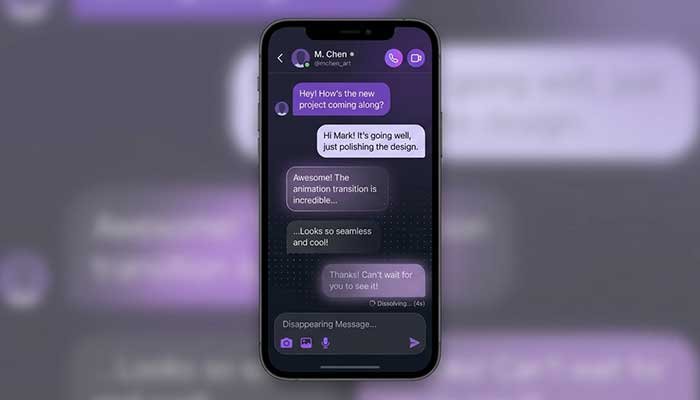
I still remember the exact moment I discovered Instagram Vanish Mode. I was texting my buddy about a genuinely embarrassing story — the kind you want to say once and never see in writing again — and my thumb accidentally swiped up on our chat. The screen went dark, a little rocket-ish animation happened, and suddenly the whole conversation looked… different. Ghostly. Temporary. I panicked for a second, thinking I’d broken the app.
Turns out, I’d just triggered Instagram Vanish Mode for the first time, completely by accident.
If you’ve had a similar “wait, what just happened” moment, you’re exactly who I’m writing this for. I’ve spent years poking at every corner of Instagram’s DM features as part of my job analyzing social platforms, and Vanish Mode is one of those features people either love, misunderstand, or straight-up fear. So let’s clear it all up — what it actually is, how to turn it on, how to turn it off, and the messy real-world details Instagram’s help page conveniently skips.
What Is Vanish Mode On Instagram, Really?
Here’s the simple version: Vanish Mode is a chat setting inside Instagram Direct Messages that makes your messages disappear after both people have seen them and left the chat. Once you exit the conversation, the messages are gone — no scrollback, no “delete for everyone” needed.
It’s basically Instagram’s answer to Snapchat’s disappearing messages, built right into the DM inbox you already use every day.
A few things I think people get wrong immediately:
- It’s not a separate app or a hidden inbox — it lives inside your normal DM thread with a specific person.
- It only applies to that one conversation, not your entire Instagram account.
- Both people have to be looking at the chat for it to activate that way — I’ll explain the swipe trigger below.
Honestly, when I first heard about it, I assumed it worked like Instagram Stories — visible for 24 hours, then poof. That’s not it at all. Vanish Mode is triggered by an action (swiping up), not a timer, and messages vanish once you both leave the thread, not after a set number of hours.
My Personal Experience with Instagram Vanish Mode
Let me tell you about the time I actually tested this on purpose, not by accident.
A friend and I were coordinating a surprise party and didn’t want the details sitting in a regular chat where a slip of the thumb (or a shared phone) could ruin everything. So I deliberately swiped up on our thread to trigger Vanish Mode and we planned the whole thing there — venue, guest list, the works.
Here’s what actually happened, and what surprised me:
- The transition was obvious. The chat background changed to a dark theme with a little animation, so there was zero confusion about whether Vanish Mode was active. I appreciated that — no ambiguity.
- Screenshots still notify. My friend took a screenshot of one message to save an address, and I got a notification about it instantly. This confused me at first because I assumed “vanish” meant “untraceable.” It doesn’t. Instagram still tells you if someone screenshots.
- The messages really did disappear. After we both backed out of the chat and came back later, the vanished messages were gone. Only the messages sent after switching back to regular mode remained.
- I almost lost something important. At one point, my friend sent the final headcount in Vanish Mode, and I forgot to jot it down before leaving the chat. When I went back in, it was gone. I had to ask again. That was a genuinely useful lesson — Vanish Mode is not the place for information you need to reference later.
That last point is honestly the biggest practical takeaway I can give you: treat Vanish Mode like a spoken conversation, not a notepad. If you’d need to remember it in writing, don’t send it there.
Read More: How to Find Your Best TikTok Emojis
How To Turn On Vanish Mode On Instagram
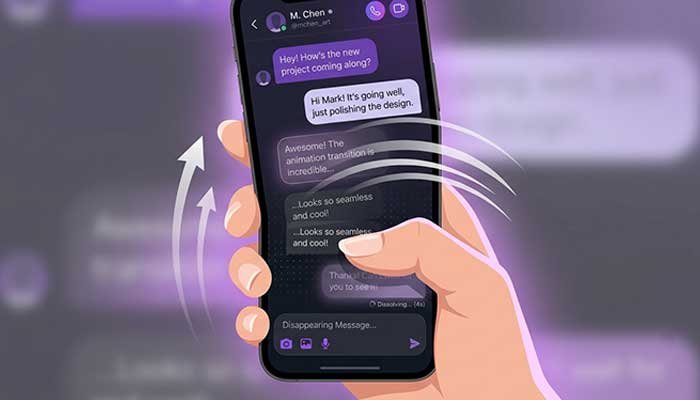
Okay, let’s get practical. Here’s exactly how I turn it on, step by step:
- Open Instagram and go to your DMs (the paper airplane icon).
- Open the conversation with the specific person you want to use Vanish Mode with.
- Swipe up from the bottom of the chat screen.
- You’ll feel/see a short animation, and the chat background will switch to a dark, dotted theme.
- That’s it — you’re now in Vanish Mode for that conversation.
A couple of details worth knowing:
- The other person gets a notification that Vanish Mode has been turned on, so it’s never a silent switch.
- You can trigger it from either your side or theirs — whoever swipes up first activates it for both of you.
- It currently works one-on-one; in my testing, group chats didn’t have the same swipe-up option, so don’t expect it in bigger threads.
Does this sound like a feature you’d actually use daily, or more of a “special occasion” tool? For me, it’s the latter — I don’t live in Vanish Mode, but I reach for it when a conversation feels like it should stay in the moment.
Read More: How to Delete Instagram Account Permanently (2026)
How To Turn Off Vanish Mode On Instagram
Turning it off is just as simple, but people sometimes overthink it:
- Open the same chat that’s currently in Vanish Mode.
- Swipe up again — the exact same gesture that turned it on.
- The chat reverts to the normal, non-vanishing background and behavior.
Alternatively, if you just leave the conversation without swiping, it stays in Vanish Mode for next time you open that specific chat — it doesn’t automatically revert. I learned this the annoying way when I assumed closing the app would “reset” it. It doesn’t. The setting sticks to that chat thread until someone manually swipes it off.
Vanish Mode vs. Regular DMs vs. Disappearing Photos: A Quick Comparison
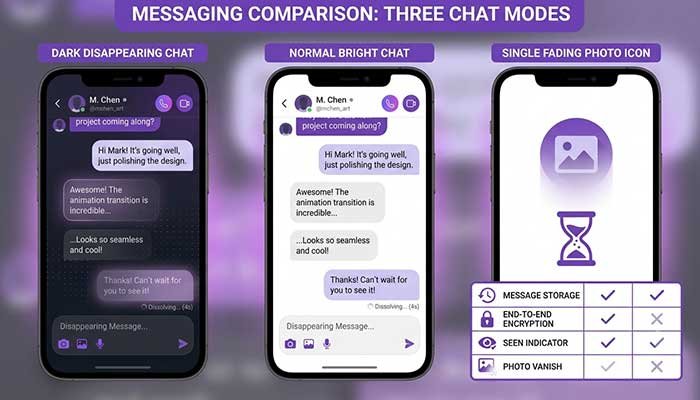
I get asked a lot how Vanish Mode compares to other “temporary” features on Instagram. Here’s a table I put together based on my own testing:
| Feature | Instagram Vanish Mode | Regular DMs | Disappearing Photo/Video in DM |
|---|---|---|---|
| Messages persist after leaving chat? | No | Yes | No (one-time view) |
| Screenshot notification? | Yes | No | Yes |
| Applies to whole account or one chat? | One chat only | Account-wide | One message at a time |
| Trigger method | Swipe up | Default state | Sender chooses “view once” |
| Works in group chats? | No (1-on-1 only, per my testing) | Yes | Yes |
| Good for | Casual, low-stakes chats | Everyday conversation | Sensitive single images |
If something needs to be remembered, save it outside the app — that’s my rule of thumb after losing that headcount message.
Common Misconceptions I Want To Clear Up
I see a lot of confusion online, so let me address the big ones directly:
“Vanish Mode Means No One Can Prove I Said It”
Not true, and I want to be clear about this because it matters. Screenshots are detectable and the other person is notified. If someone really wants a record, they could also just photograph the screen with another device — no notification for that. Don’t treat Vanish Mode as untraceable.
“It’s the Same as Snapchat”
I understand the comparison, but the mechanics are different. Snapchat’s disappearing messages are usually tied to opening/viewing them. Vanish Mode is tied to leaving the entire chat thread — which, in my experience, makes it feel a bit more forgiving and less rushed than Snapchat’s read-and-gone approach.
“It Deletes Everything Instantly”
Also not quite right. In my testing, messages remain visible while you’re both still in the chat. It’s only after you exit that the vanish actually happens.
When I Actually Use Vanish Mode (And When I Don’t)
Being fully honest here — my use of this feature is pretty situational:
I use it for:
- Quick, casual banter I don’t need a record of
- Sensitive personal topics I’d rather not have sitting in my inbox forever
- Light-hearted jokes that would look weird out of context months later
I avoid it for:
- Anything logistical (addresses, dates, confirmation numbers)
- Work-adjacent conversations, even casual ones
- Conversations where I might want to search back later — Instagram’s DM search doesn’t help you once messages are gone
Does that match how you’d use it, or do you see a different use case? I’d genuinely be curious, because I think most people default to thinking of it as a “secretive” feature when really it’s more about keeping casual chats feeling casual.
FAQ: Instagram Vanish Mode
Does Vanish Mode notify the other person when I turn it on?
Yes. Based on my testing, both people get a clear notification the moment Vanish Mode is activated, so it’s never done without the other person knowing.
Can I use Vanish Mode in group chats?
In my experience testing this, no — the swipe-up gesture only appeared in one-on-one conversations, not group DMs.
Will Instagram tell the other person if I screenshot a Vanish Mode message?
Yes, and this surprised me the first time it happened. A screenshot notification popped up instantly, just like it does in regular disappearing-photo DMs.
Do Vanish Mode messages disappear immediately after being read?
No. They stay visible while you’re both in the chat and disappear only after you both leave the conversation — not the instant a message is read.
Is Vanish Mode the same as Instagram’s “view once” photo feature?
No, they’re related but different. “View once” applies to individual photos or videos. Vanish Mode applies to the entire text conversation until it’s switched off.
Martin’s Final Tip
If there’s one thing I want you to walk away with, it’s this: Vanish Mode is great for keeping casual conversations feeling light and temporary, but it is absolutely not a place to store information you’ll need later. I learned that lesson the hard way with a lost party headcount, and I’d rather you skip that headache.
Try swiping up on a chat with someone you trust, get a feel for how it behaves, and decide for yourself if it fits your texting style. Have you tried Vanish Mode yet? I’d genuinely love to hear what you used it for — drop it in the comments or send me a message (regular mode is fine for that one).